Navigating cryptocurrency exchanges can feel overwhelming if you are starting your crypto journey today. Knowing how to use bybit beginners 2026 step-by-step is essential to managing your capital securely and maximizing your trading opportunities.
Bybit has evolved into one of the world’s leading crypto platforms, serving tens of millions of users with liquidity, user-friendly trading interfaces, passive income tools, and security features. This guide provides a walkthrough of everything you need to know about how to use bybit beginners 2026, covering account creation, identity verification, deposits, spot trading, copy trading, yield generation, withdrawals, and essential security practices.
Section 1: Bybit Platform Overview & Account Setup
What is Bybit?
Founded in 2018, Bybit has transformed from a crypto derivatives exchange into a comprehensive digital asset ecosystem offering spot trading, copy trading, staking, options, and AI trading tools. Whether you want to purchase your first digital asset or run automated trading strategies, knowing how to use bybit beginners 2026 gives you access to high liquidity, low trading fees, and customer support.
For a deep dive into platform security, fees, and regulatory compliance, check out our full Bybit Review 2026.
Step-by-Step Account Registration
Getting started with Bybit takes only a few minutes.
-
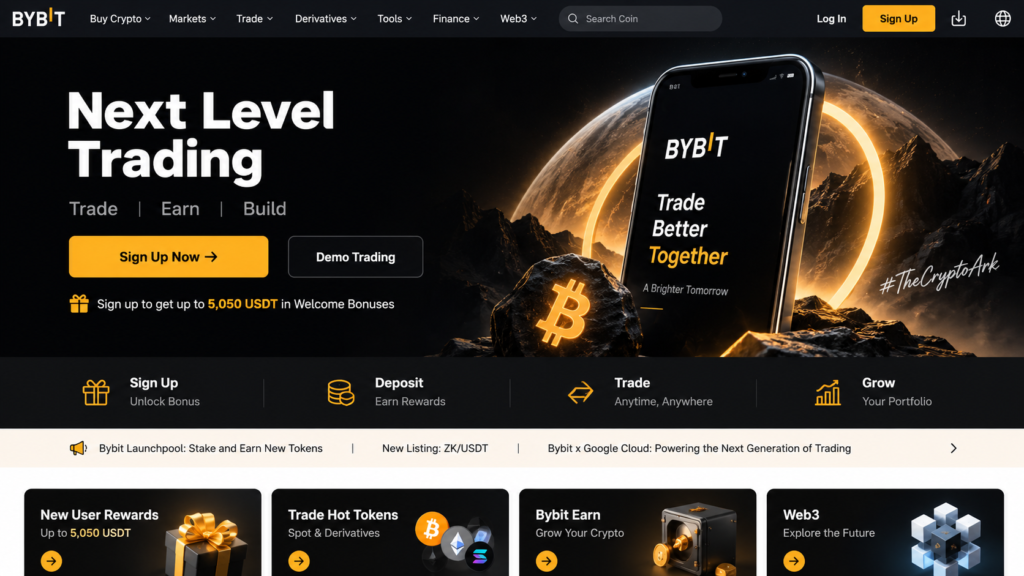
Visit the Official Website or Mobile App: Open your browser and navigate to Bybit’s official landing page, or download the official app from the iOS App Store or Google Play Store.
-
Click “Sign Up“: Located at the top-right corner of the interface.
-
Choose Registration Method: Register using your Email Address or Mobile Phone Number.
-
Create a Strong Password: Ensure your password contains at least 8 characters, including upper and lower case letters, numbers, and special symbols.
-
Apply a Referral Code: If you have a referral code, enter it during registration to claim deposit bonuses and fee discounts. (Claim your welcome rewards using our [Bybit Referral Code 2026]).
-
Verify Email/Phone: Enter the 6-digit verification code sent to your registered email address or phone number.
Completing Identity Verification (KYC)
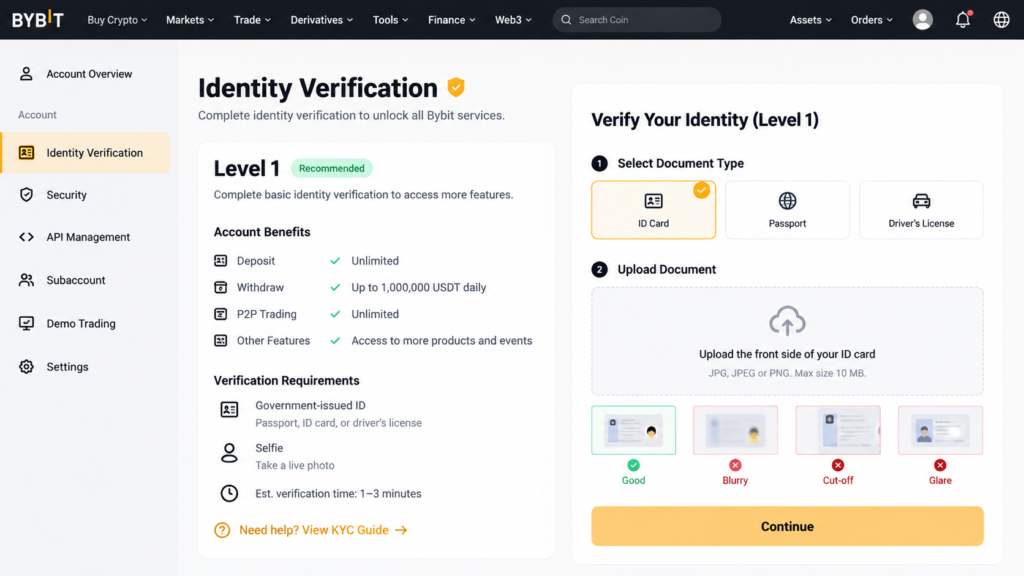
Bybit requires mandatory Identity Verification (Know Your Customer / KYC) to unlock full functionality, including deposits, trading limits, and fiat withdrawals.
-
Level 1 Verification (Required for regular use):
-
Click on your Account Avatar in the upper right corner and select Account & Security.
-
Click Verify Now under Identity Verification.
-
Select your country/region of residence and document type (Government-issued ID, Passport, or Driver’s License).
-
Upload a photo of your identity document.
-
Complete the facial liveness scan using your webcam or phone camera.
-
Processing Time: Level 1 verification is usually reviewed and approved within 15 to 30 minutes.
-
-
Level 2 Verification (For higher withdrawal limits):
-
Requires submitting proof of address (utility bill, bank statement, or tax document dated within the last 3 months).
-
Mastering registration and KYC is the foundational step when learning how to use bybit beginners 2026 securely.
Section 2: Navigating the Dashboard & Funding Your Account
Dashboard Navigation Guide
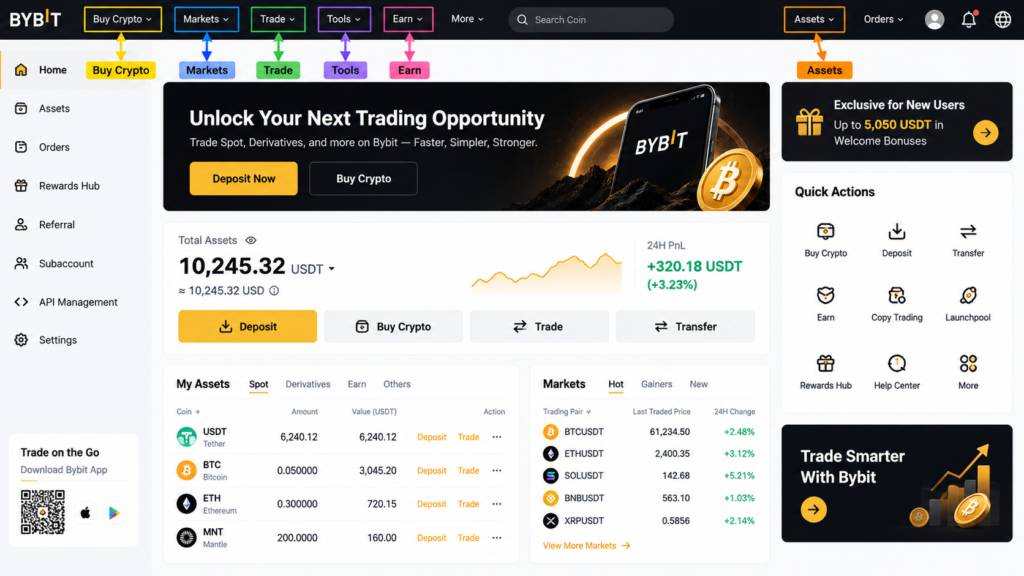
Once logged in, the main dashboard provides access to all major features.
-
Buy Crypto: Quick access to One-Click Buy, P2P Trading, and Fiat Deposits.
-
Markets: Overview of crypto pairs, top gainers, 24-hour trading volumes, and trending tokens.
-
Trade: Access Spot Trading, Margin Trading, and Convert features.
-
Tools: Access automated tools like Copy Trading and Trading Bots.
-
Earn: Access passive income products including Flexible Savings, Staking, and Dual Investment.
-
Assets (Wallet Icon): Manage your balances across Funding, Spot, Derivatives, and Earn accounts.
Deposit Methods on Bybit
Funding your account is a critical part of how to use bybit beginners 2026. Bybit offers four deposit channels:
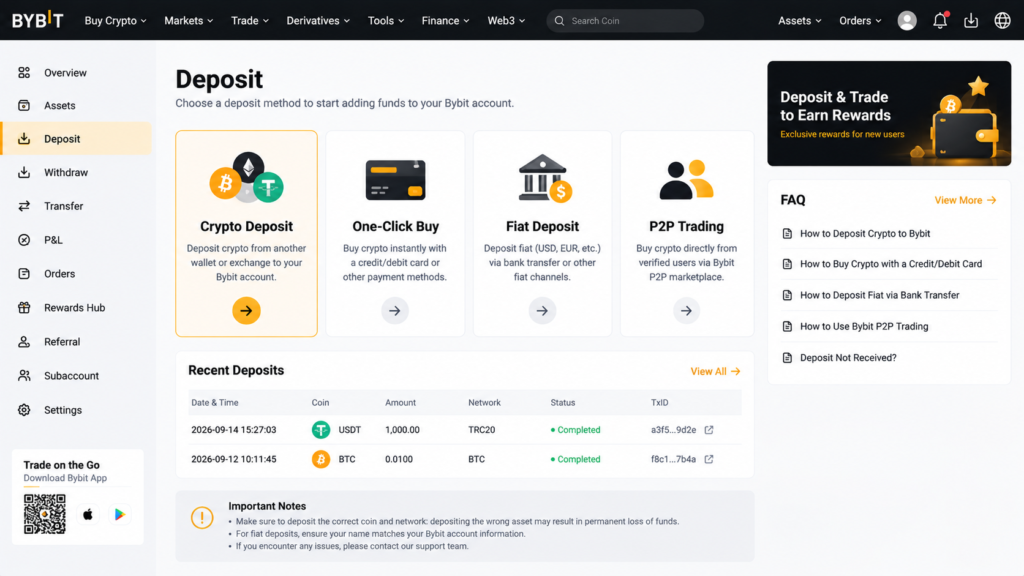
1. Crypto Deposit (Best for existing wallet holders)
If you already hold cryptocurrency in another wallet or exchange:
-
Navigate to Assets $\rightarrow$ Deposit.
-
Select the cryptocurrency (e.g., USDT, BTC, ETH, SOL).
-
Select the correct Blockchain Network (e.g., TRC-20, ERC-20, Solana, Arbitrum).
⚠️ Warning: Always verify that the network selected on Bybit matches the network selected on your sending wallet. Selecting the wrong network will lead to a permanent loss of funds!
-
Copy the generated deposit address or scan the QR code.
-
Complete the withdrawal from your external source.
2. One-Click Buy (Credit / Debit Cards)
-
Go to Buy Crypto $\rightarrow$ One-Click Buy.
-
Select your fiat currency (USD, EUR, GBP, AUD, etc.) and the cryptocurrency you wish to receive (e.g., USDT).
-
Select Visa/Mastercard or supported third-party providers (Apple Pay, Google Pay).
-
Enter your card details and confirm the transaction.
3. Peer-to-Peer (P2P) Trading (Zero Platform Fees)
Bybit P2P allows you to buy crypto directly from other users using local bank transfers or e-wallets:
-
Go to Buy Crypto $\rightarrow$ P2P Trading.
-
Choose Buy, select your fiat currency, and pick an asset (USDT is recommended for beginners).
-
Filter by merchant rating, completion rate, and payment method (e.g., Local Bank Transfer).
-
Enter the amount, initiate the trade, and transfer funds to the seller’s bank account details provided on screen.
-
Click Payment Completed. Once verified by the seller, Bybit’s escrow service releases the crypto into your Funding Account.
4. Fiat Deposit
-
Select Buy Crypto $\rightarrow$ Fiat Deposit.
-
Select your local currency and your payment method (SEPA transfer, Bank Transfer, or wire).
-
Complete the transfer to fund your Bybit fiat balance.
Understanding these funding options is a key component of how to use bybit beginners 2026 efficiently.
Section 3: Making Your First Trade on Bybit Spot
Trading on the Spot market is the straightforward way to buy real digital assets without financial leverage.
Navigating the Spot Trading Interface
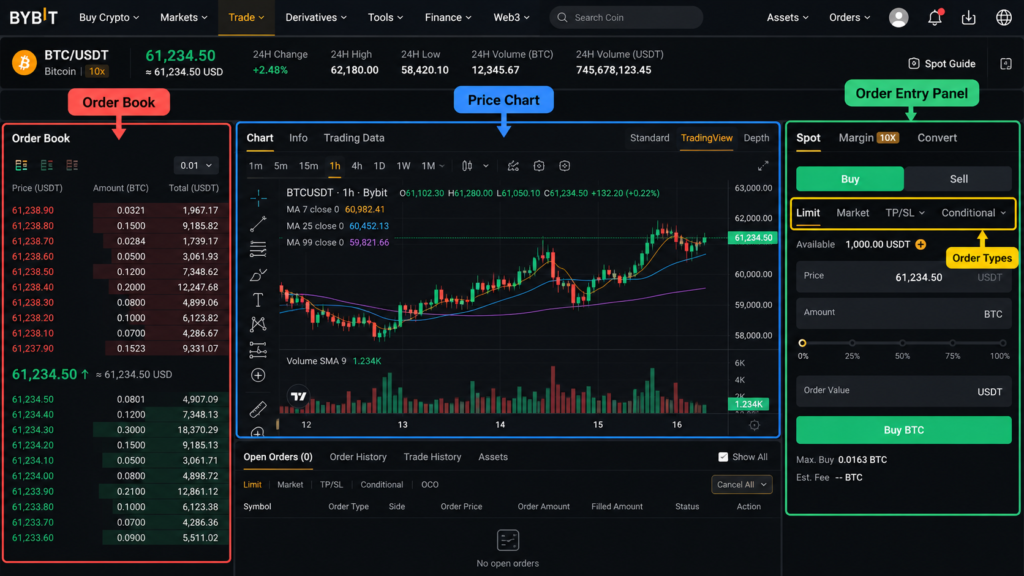
Go to Trade $\rightarrow$ Spot Trading and choose your trading pair (e.g., BTC/USDT or ETH/USDT). The interface consists of:
-
Chart Panel: Displays real-time candlestick price charts (powered by TradingView).
-
Order Book: Shows real-time bid (buy) and ask (sell) orders placed by market participants.
-
Order Panel (Right side): Where you execute buy and sell orders.
-
Open Orders / Trade History (Bottom): Shows active pending orders and execution logs.
Market Orders vs. Limit Orders Explained
| Feature | Market Order | Limit Order |
| Execution Speed | Immediate (instant) | Conditional (waits for price target) |
| Execution Price | Best available market price | Exact price specified (or better) |
| Best Used For | Fast entry/exit during rapid movements | Precise control over purchase/sale price |
| Fee Category | Taker Fee | Maker Fee (often lower) |
How to Execute a Market Order (Step-by-Step):
-
On the Spot trading interface, ensure your account funds are transferred to your Spot Account.
-
Select Buy.
-
Click the Market tab on the order panel.
-
Enter the amount of USDT you wish to spend (e.g.,
100 USDT). -
Click Buy BTC. The trade executes instantly, and BTC will appear in your Spot wallet balance.
How to Execute a Limit Order (Step-by-Step):
-
Select the Limit tab on the order panel.
-
Set your desired purchase price (e.g., if BTC is trading at $\$88,000$, you can set a limit order at $\$85,000$).
-
Enter the quantity of BTC or amount of USDT you wish to allocate.
-
Click Buy BTC.
-
Your order goes into the order book and will trigger automatically if the market price drops to $\$85,000$.
Knowing when to use Limit versus Market orders is essential when mastering how to use bybit beginners 2026.
Section 4: Automated & Passive Income: Bybit Copy Trading and Bybit Earn
Bybit Copy Trading for Beginners
Copy Trading allows beginners to replicate the trades of experienced market traders automatically.
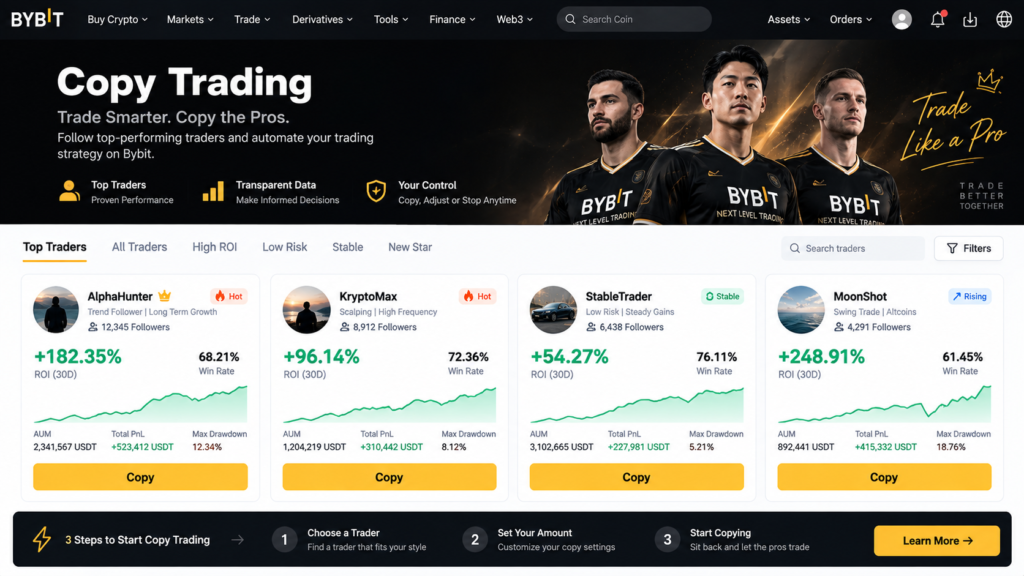
How Copy Trading Works:
-
You select a Master Trader based on public performance metrics (Win Rate, ROI, Max Drawdown, AUM).
-
You allocate a specific budget (e.g., 200 USDT).
-
Whenever the Master Trader opens or closes a trade, the platform replicates the trade in your account proportionally.
Step-by-Step Setup Guide:
-
Navigate to Tools $\rightarrow$ Copy Trading.
-
Filter traders by performance, stability, or low-risk profiles.
-
Review key metrics: Look for traders with a consistent track record over 90+ days and low drawdown ($<15\%$).
-
Click Copy next to your selected Master Trader.
-
Set your investment parameters:
-
Copy Mode: Choose Smart Copy Mode (recommended for beginners) or Advanced Copy Mode.
-
Investment Amount: Total funds allocated to copy this trader.
-
Stop-Loss Per Copy Order: Set a maximum risk limit (e.g., auto-close if a trade loses $10\%$).
-
-
Click Copy Now to start automatically following trades.
Bybit Earn: Staking and Yield Products
If you prefer holding assets long-term rather than active trading, Bybit Earn offers passive yield products.
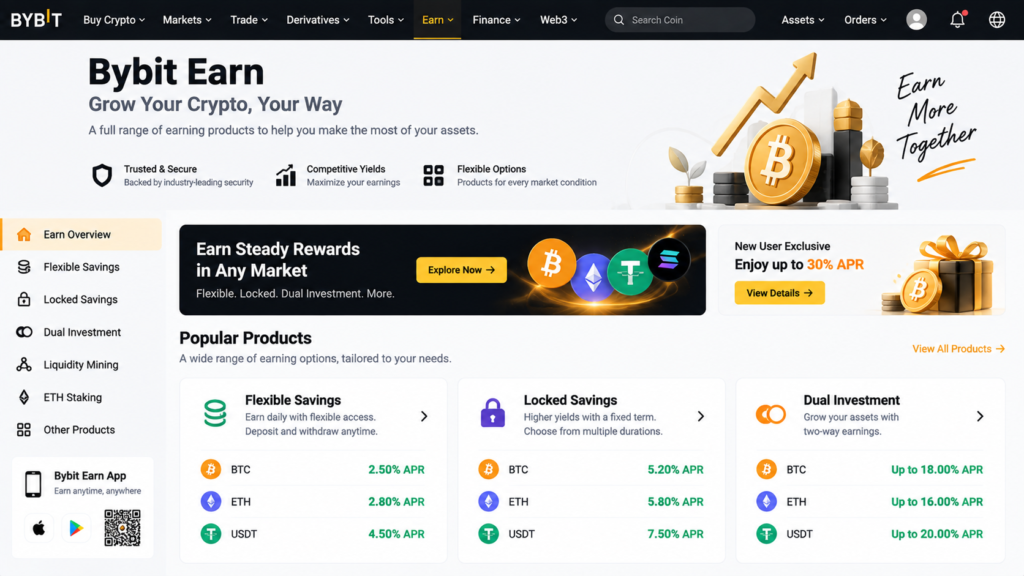
1. Flexible Savings
-
How it works: Deposit assets (USDT, USDC, BTC, ETH) and earn variable daily yield. You can withdraw your principal and earnings at any time without penalty.
-
Best for: Liquid capital reserve management.
2. Fixed / Locked Savings
-
How it works: Lock your crypto for a fixed duration (7, 30, 60, or 90 days) to earn a higher fixed interest rate.
-
Best for: Long-term holders seeking predictable returns on stablecoins or major cryptos.
3. Dual Investment & Structured Products
-
How it works: High-yield non-guaranteed products that earn yields based on price predictions at settlement dates.
-
Best for: Advanced users comfortable with market volatility.
Incorporating passive earning strategies provides balanced asset management when exploring how to use bybit beginners 2026.
Section 5: Security Best Practices & How to Withdraw Funds
Security Best Practices on Bybit
Protecting your digital assets is as important as learning to trade them. Follow these operational security rules:
-
Enable Two-Factor Authentication (2FA):
-
Link Google Authenticator to your account immediately. Do not rely solely on SMS verification, as SMS is vulnerable to SIM-swapping attacks. (Learn more in our guide on [How to Set Up 2FA]).
-
-
Setup an Anti-Phishing Code:
-
Go to Account & Security $\rightarrow$ Anti-Phishing Code. Set a unique phrase that will appear on all authentic emails sent by Bybit, helping you spot fraudulent emails.
-
-
Enable Withdrawal White-listing:
-
Restrict withdrawals so funds can only be sent to pre-approved wallet addresses saved in your address book.
-
-
Use Strong, Unique Credentials:
-
Never reuse passwords across multiple exchanges or email accounts.
-
How to Withdraw Funds from Bybit
Whether transferring assets to a personal cold wallet or off-ramping into local currency, withdrawals are simple.
1. Crypto Withdrawal (Transferring to External Wallet)
-
Navigate to Assets $\rightarrow$ Withdraw.
-
Select the asset to withdraw (e.g., USDT, BTC).
-
Paste the destination wallet address. (Review our tutorial on [How to Transfer Crypto] for step-by-step guidance).
-
Choose the network matching the destination wallet.
-
Enter the withdrawal amount and verify network transfer fees.
-
Confirm the transaction using 2FA codes (Email code + Google Authenticator).
2. Fiat Off-Ramp / P2P Withdrawal
-
Go to Buy Crypto $\rightarrow$ P2P Trading $\rightarrow$ Sell.
-
Choose your local currency, enter the amount of USDT to sell, and select your preferred payment receipt method (Bank Transfer).
-
Confirm the order and wait for the buyer to transfer funds to your bank account.
-
Crucial Rule: Verify that the fiat money has arrived in your bank account balance before clicking Release Crypto.
Following secure withdrawal routines completes your understanding of how to use bybit beginners 2026.
Section 6: Frequently Asked Questions (FAQ)
Is Bybit safe for beginners in 2026?
Yes. Bybit maintains a 1:1 Proof of Reserves policy, stores user funds in cold storage systems, and incorporates multi-layered security protocols including mandatory 2FA and facial KYC verification.
What are Bybit trading fees?
Bybit maintains competitive fee structures. Spot trading fees start at 0.1% for both Makers and Takers, with reductions based on VIP tier status and trading volume.
How much money do I need to start trading on Bybit?
You can start with as little as $10 USD. Bybit’s low minimum trade requirements allow beginners to practice without risking large sums of capital.
How does Bybit compare to other major exchanges?
Bybit stands out for its trading liquidity, low latency execution, comprehensive copy trading tools, and responsive customer support.
Conclusion
Mastering how to use bybit beginners 2026 is straightforward when broken down into steps: register an account, complete KYC, fund your wallet, practice spot trading with limit orders, and enforce strict security protocols. By leveraging tools like Bybit Earn and Copy Trading, you can build a crypto portfolio suited to your risk tolerance. Always start small, secure your account with 2FA, and continue learning as you navigate the digital asset space.
Disclaimer: This article is for educational and informational purposes only and should not be considered financial, investment, or legal advice. Cryptocurrency trading and investing involve significant market risks, including the potential total loss of principal. Always conduct your own research (DYOR) and consult with a qualified financial advisor before making any investment decisions. Referral links within this content may provide promotional bonuses or commissions at no additional cost to you.