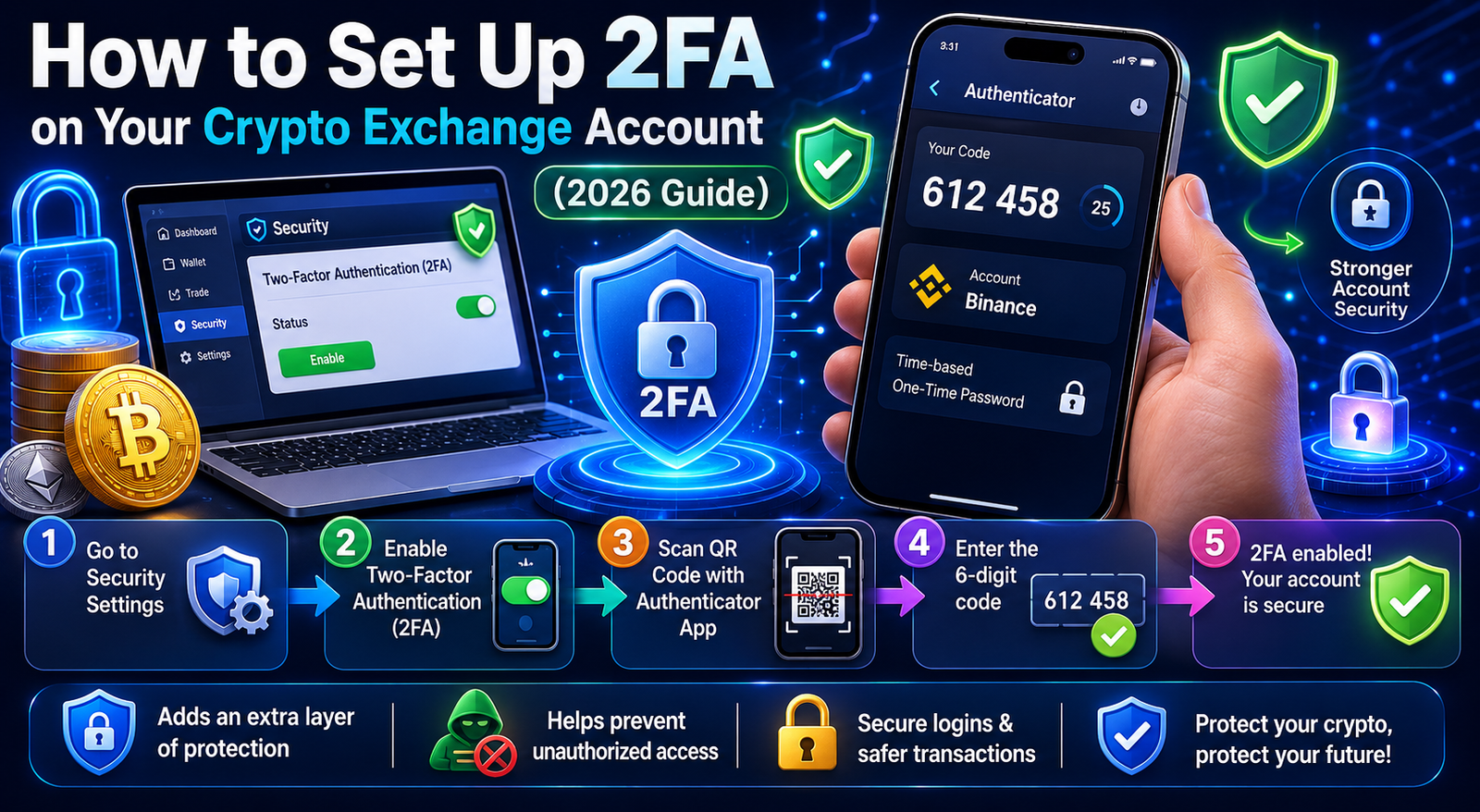
Learn how to set up 2fa crypto exchange 2026 guidelines to secure your digital assets from hackers, using Google Authenticator and physical security keys.
In the digital asset ecosystem, your password is no longer a sufficient line of defense. Hackers, phishing networks, and social engineering scams have grown increasingly sophisticated, making credential stuffing attacks a daily threat to investors. If you leave your trading account protected by only a single password, you are essentially leaving the vault door unlocked.
To safeguard your hard-earned capital, learning how to set up 2fa crypto exchange 2026 protocols is the single most vital operational security measure you can take. Two-Factor Authentication (2FA) acts as an mandatory secondary verification layer, ensuring that even if a malicious actor uncovers your login credentials, they cannot access your funds or execute unauthorized withdrawals. This comprehensive, step-by-step technical guide walks you through maximizing your exchange security defenses this year.
1. Understanding 2FA: Your Shield Against Modern Exchange Exploits
Two-Factor Authentication (2FA) is an identity verification methodology that requires a user to supply two distinct pieces of evidence before gaining account access or authorizing asset transfers. This security model relies on a combination of something you know (your master account password) and something you have (a physical smartphone or hardware security token).
Standard Single-Factor Authentication (Weak):
[Username + Password] ──> Unrestricted Vault Access ──> Vulnerable to Phishing

Modern Two-Factor Authentication (Secure):
[Username + Password] ──> [Dynamic Cryptographic Code / Token] ──> Insulated Account Access
When considering how to set up 2fa crypto exchange 2026 frameworks, you must evaluate the security hierarchy of the different verification vectors available:
SMS-Based 2FA (Lowest Security)
SMS authentication sends a numeric code to your mobile carrier network via text message. While better than nothing, this is heavily discouraged for digital asset platforms. Malicious actors can execute SIM-swapping attacks, bribing or tricking mobile carrier employees to port your phone number onto a hacker-controlled SIM card, completely bypassing this layer.
Time-Based One-Time Password Apps (TOTP – Recommended)
Applications like Google Authenticator or Authy run highly secure, local cryptographic algorithms on your smartphone. These programs generate a brand-new, unique 6-digit verification sequence every 30 seconds. Because these keys do not rely on mobile carrier networks, they are completely immune to SIM-swapping exploits.
Physical Hardware Security Keys (Highest Security)
Physical USB/NFC tokens, such as YubiKeys, offer enterprise-grade protection. To log in or move capital, you must physically insert or tap the physical key against your computer or smartphone. This completely prevents remote hacking attempts, making it the premier choice for institutional-grade safety.
Implementing these systems prevents catastrophic asset losses. To learn more about modern security frameworks and behavioral threats, check out our guide on [How to Avoid Crypto Scams 2026]([link bài #24]).
2. Setting Up TOTP Applications: Installing Google Authenticator and Authy
Before you can execute the configuration steps on your preferred trading interface, you must configure a native verification app on your hardware device. This setup serves as the foundational core when executing how to set up 2fa crypto exchange 2026 instructions.
Onboarding Your Verification Engine:
Step 1: Download Official App ──> Step 2: Establish Secure Device Backup ──> Step 3: Initialize Exchange Linking
Step 1: Secure Download
Navigate to your mobile operating system’s native store (Apple App Store for iOS or Google Play Store for Android) and download either Google Authenticator or Twilio Authy. Ensure you verify the developer credentials to avoid downloading copycat phishing clones.
[Screenshot Placeholder: Google Authenticator app store page showing official developer signature]
Step 2: Selecting Your Infrastructure
-
Google Authenticator: Highly streamlined, fast, and lightweight. It allows you to synchronize your active tokens directly with your secure Google Account cloud profile for convenient cross-device access.
-
Authy: Offers explicit multi-device synchronization capabilities and a standalone desktop application. It requires an encrypted master cloud password, allowing you to quickly recover tokens if your primary smartphone undergoes structural hardware failure.
Once the application is successfully initialized, your mobile device is fully prepared to act as a secure, local hardware cryptographic vault, ready to hook into your centralized trading dashboards.
3. Step-by-Step Configuration Guide for Major Global Exchanges
Centralized trading desks feature dedicated security hubs to facilitate third-party authenticator handshakes. Below is the precise operational walkthrough detailing how to set up 2fa crypto exchange 2026 parameters on the world’s leading liquidity platforms.
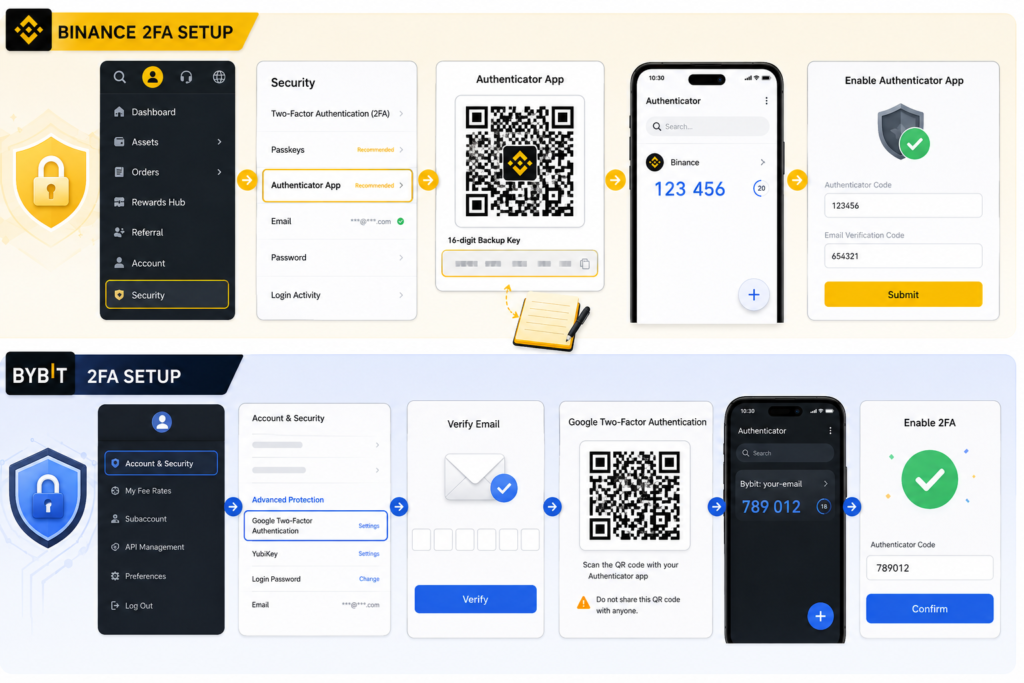
Part A: Activating TOTP Security on Binance
Binance utilizes highly rigid account security pipelines. To optimize your account infrastructure, refer to the following guide:
-
Log into your verified profile on the desktop web portal or official app. Navigate to the top-right profile icon, and enter the Security command menu.
-
Locate the section labeled Authenticator App (Recommended) and click on Manage or Enable.
[Screenshot Placeholder: Binance Security dashboard highlighting the Google Auth setup wizard]
-
The platform will display a unique 16-digit alphanumeric Backup Key alongside a structural QR code. Stop immediately and copy this 16-digit alphanumeric key onto a physical piece of paper. Store this paper in a secure location, separate from your electronic devices.
-
Open your smartphone’s Google Authenticator app, tap the “+” symbol in the lower right corner, and select Scan a QR code. Hold your camera up to your desktop monitor to read the screen.
-
To finalize the integration, Binance requires a dual-verification sequence. Input the temporary 6-digit code currently cycling on your authenticator app alongside the transactional email verification code sent to your inbox. Click Submit to permanently lock down the account.
For deeper insights into this platform’s extensive security architecture, see our comprehensive Binance Review 2026.
Part B: Activating TOTP Security on Bybit
Bybit offers an exceptionally modern user layout, allowing users to configure custom security thresholds easily. Here is how to set up 2fa crypto exchange 2026 metrics on Bybit:
-
Access your profile dashboard, access your account menu, and click on Account & Security.
-
Scroll down to the Advanced Protection parameters to locate the Google Two-Factor Authentication sub-section. Click on Settings.
[Screenshot Placeholder: Bybit Security settings displaying the 2FA configurations section]
-
Bybit will immediately dispatch a validation code to your registered email address to verify your identity. Input this sequence into the verification box to unlock the secret QR configuration matrix.
-
Launch your chosen authenticator app, press the addition icon, and scan the unique Bybit configuration graphic.
[Screenshot Placeholder: Bybit QR code scanning page with security warnings emphasized]
-
Once the profile labeled
Bybit:your-emailbegins generating codes on your smartphone app, input the active 6-digit sequence back into the Bybit dashboard confirmation box and click Confirm.
Discover how this platform protects client assets during periods of market volatility in our full Bybit Review 2026.
4. The Critical Importance of Backup Codes and Seed Phrases
The single biggest error made by retail digital asset investors is skipping or rushing through the backup phase during their initial security configuration. When working through how to set up 2fa crypto exchange 2026 procedures, the alphanumeric backup key or seed phrase shown alongside the QR code is not just a secondary option—it is your ultimate lifeline and the bedrock of your account’s defense system.
The Secure Backup Protocol
To ensure your digital assets remain protected against both external hacks and accidental lockouts, you must follow a strict, air-gapped backup protocol:
┌──────────────────────────────────────────────────────────────────┐
│   Never Take Screenshots ─────> Write Key Safely on Paper/Metal  │
├──────────────────────────────────────────────────────────────────┤
│   Store Hard Copies ──────────> Place in Water & Fire-Proof Safe │
├──────────────────────────────────────────────────────────────────┤
│   Zero Cloud Exposure ────────> Never Store in Unencrypted Clouds│
└──────────────────────────────────────────────────────────────────┘
Understanding the Cryptographic Foundation
The 16-digit alphanumeric string provided during configuration is the master cryptographic seed used by the Time-Based One-Time Password (TOTP) algorithm to generate your rolling, time-sensitive codes. If your smartphone gets dropped in water, stolen, or encounters a fatal motherboard crash, you instantly lose access to the local application database containing your active security tokens.
If you possess the handwritten backup code, the recovery process is seamless. You can easily input that specific string into a brand-new smartphone’s authenticator app to restore your live authorization streams instantly.
Conversely, if you fail to properly document this seed while learning how to set up 2fa crypto exchange 2026 platforms safely, losing your device means facing an extensive, multi-day security lockdown. You will be forced to undergo invasive Know Your Customer (KYC) re-verification, video identity checks, and manual reviews by exchange compliance teams to regain access to your funds—a vulnerability that can be entirely avoided with a disciplined backup strategy.
5. Emergency Protocol: What to Do If You Lose Access to Your 2FA Device
If you lose your smartphone and lack an offline backup key, do not panic. Centralized exchanges provide explicit manual reset frameworks, though they require comprehensive identity verification to prevent malicious takeovers.
Emergency Resolution Pipeline:
[Device Lost] ──> [Trigger "Authenticator Unavailable" Link] ──> [Pass KYC Biometric Check] ──> [48-Hour Safety Lock]
Follow this step-by-step emergency protocol to restore account access:
Step 1: Isolate and Freeze Your Account
If your device was stolen, immediately contact the platform’s support desk using an alternative device or use the “Freeze Account” link embedded within previous transactional emails to lock down all active withdrawal pipelines.
Step 2: Trigger the Native Security Bypass Wizard
Navigate to the account login window on your platform. Enter your master username and password. When the portal prompts you for the missing 6-digit verification code, click the sub-link labeled “Authenticator Unavailable?” or “Lost Your 2FA?”.
Step 3: Complete Biometric KYC Re-Verification
The platform will require you to complete an advanced identity verification audit. This process typically involves uploading a fresh photo of your government-issued passport or driver’s license alongside a live biometric facial scan to prove you are the legitimate account holder.
Step 4: Endure the Safety Withdrawal Hold
Once the exchange validates your biometric identity markers, they will manually deactivate the old validation system. For strict account safety, high-tier trading desks enforce a strict 24-to-48-hour complete asset withdrawal lock on the account. This window ensures that if a malicious actor attempts a fraudulent reset, the rightful owner has ample time to flag and cancel the request.
6. Frequently Asked Questions (FAQ) Regarding 2FA Architecture
Why should I completely avoid SMS-based verification?
While SMS-based verification is better than having no protection at all, it is highly insecure for securing digital assets. Relying on SMS authentication leaves you exceptionally vulnerable to SIM-swapping attacks. In a SIM-swap scenario, malicious actors use social engineering to trick your mobile carrier into porting your phone number to a SIM card under their control.
Once successful, hackers intercept your incoming mobile carrier traffic, allowing them to bypass basic security layers and reset your passwords remotely—all without ever handling your physical device. When learning how to set up 2fa crypto exchange 2026 standards, security experts universally recommend bypassing SMS entirely in favor of time-based one-time password (TOTP) apps or physical hardware keys.
Can I share my 16-digit secret backup key with support?
No. Absolutely never share your secret key with anyone under any circumstances. Your 16-digit secret backup key is the master seed used to generate your rolling security codes.
No legitimate support agent, administrator, or representative from any trading desk or cryptocurrency platform will ever request your backup phrase, seed string, or active authenticator codes. Anyone asking for this data is executing a phishing scam trying to steal your funds. Treat this key with the same level of absolute confidentiality as your private keys or seed phrases.
What happens if I type the authenticator code and it keeps failing?
If your platform rejects validly generated codes, this error is almost always caused by a clock unsynchronization issue. TOTP algorithms rely on perfect system time matching between the exchange’s servers and your local device. Even a discrepancy of 30 seconds can cause the codes to fail.
To resolve this on an Android device, open your authenticator app settings, find the Time Correction for Codes option, and select Sync Now. On iOS devices, go to your main phone Settings > General > Date & Time, and ensure Set Automatically is toggled on. Recalibrating your device’s internal clock will instantly fix the validation errors.
Is it safe to back up my authentication credentials to iCloud or Google Cloud?
While cloud synchronization offers excellent convenience if you lose or damage your phone, it introduces a centralized point of failure. If an attacker gains unauthorized access to your primary Google or Apple master cloud profile through phishing or data breaches, they can download your entire authentication database.
For users managing large capital accounts, utilizing completely offline, handwritten backup strings stored in a fireproof safe, or migrating to physical hardware tokens (like YubiKeys), is highly recommended. Understanding how to set up 2fa crypto exchange 2026 protocols means balancing convenience against risk; for maximum security, keeping your backup infrastructure entirely air-gapped from the internet is always the safest bet.
Conclusion
Mastering how to set up 2fa crypto exchange 2026 processes is an essential foundation for serious investing. While navigating advanced verification prompts introduces a small amount of friction into your daily trading workflow, it remains a vital security practice.
By avoiding vulnerable SMS codes, setting up local authenticator applications, and safely storing your master backup phrases offline, you significantly minimize account vulnerabilities—leaving you free to navigate the digital asset markets with absolute confidence and peace of mind.
Disclaimer: Cryptocurrency trading and asset custody involve substantial financial risk and are subject to sophisticated technological threats. Implementing Two-Factor Authentication mitigates specific account takeover risks but does not protect against broader systemic platform insolvency, smart contract exploits, or market volatility losses. The information provided in this technical guide is purely for educational purposes and does not constitute formal financial, technical, or investment advice. Always conduct individual due diligence to verify security measures relative to your specific platform setup.