Navigating cryptocurrency exchanges can feel overwhelming if you are new to the digital asset market. Traditional bank deposits or credit card purchases often come with hefty international processing fees, strict banking regulations, or geographical limitations. This is where peer-to-peer (P2P) trading becomes an essential gateway for crypto investors worldwide.
Learning how to use binance p2p allows you to buy and sell cryptocurrencies directly with other users using your local currency and preferred local payment methods. Binance P2P eliminates the traditional middleman exchange order book, offering zero-fee taker transactions, hundreds of local payment options, and built-in escrow protection.
This complete 2026 beginner’s guide explains how to use binance p2p safely, step-by-step instructions for buying and selling USDT, key safety tips, and dispute handling mechanisms.
1. What Is Binance P2P and Why Is It Essential for Global Users?
Understanding Binance P2P vs. Direct Spot/Convert Purchases
To understand how to use binance p2p, it helps to contrast it with standard spot trading or direct fiat channels on Binance:
-
Direct Spot / Fiat On-Ramp: You purchase crypto directly from Binance or match orders on an order book. This requires direct bank transfers to Binance bank accounts or credit card payments, which may involve third-party card processing fees (typically around 1% to 2% depending on region).
-
Binance P2P Trading: You trade directly with an individual person or verified merchant. You transfer money directly from your local bank account, e-wallet, or cash payment app to the seller’s account. Binance acts as a secure escrow provider to hold the crypto until both sides confirm payment completion.
| Feature | Binance Spot / Direct Purchase | Binance P2P Trading |
| Trading Counterparty | Binance Order Book / Exchange | Peer-to-Peer Users & Merchants |
| Taker Fee Rate | Standard 0.10% (0.075% with BNB) | 0% Zero Platform Fee for takers |
| Payment Channel | Cards, SEPA, Swift, Third-party gateways | Over 1,000+ Local Bank & E-Wallet options |
| Fund Transfer Method | Deposited directly to Binance account | Direct account-to-account local transfer |
| Asset Release | Instant market execution | Secured via Escrow system |
When mastering how to use binance p2p, knowing that takers pay 0% fees makes it one of the most cost-effective methods to enter the crypto market.
Why Binance P2P Is Vital in Regions like Nigeria, Pakistan, and Vietnam
In markets across Asia, Africa, and Latin America, accessing international banking rails can be difficult due to foreign exchange controls or local banking restrictions on crypto transactions. Understanding how to use binance p2p is especially critical in countries like Nigeria, Pakistan, and Vietnam:
-
Local Currency Compatibility: P2P allows users to trade seamlessly using local currencies such as NGN (Nigerian Naira), PKR (Pakistani Rupee), and VND (Vietnamese Dong) through localized payment methods (e.g., Kuda, Chipper Cash, Easypaisa, JazzCash, Vietcombank, Momo).
-
No Foreign Currency Exchange Fees: Converting local currency to USD via bank transfers incurs steep FX markup fees. P2P pairs local fiat directly with stablecoins like USDT or BUSD/USDC.
-
Financial Inclusion: Anyone with a verified local bank account or mobile money e-wallet can access global liquidity without requiring an international credit card.
Related Resource: For a detailed breakdown of Binance features and safety protocols, read our Binance Review 2026. If you are absolute new to the ecosystem, check our guide on How to Use Binance 2026.
2. Fact-Check Checkpoints: Key 2026 Technical Parameters
Before taking your first trade, keep these verified fact-checked operational parameters in mind when learning how to use binance p2p:
-
P2P Taker Platform Fees (October 2026): 0% (Free). If you respond to an existing ad on the marketplace to buy or sell crypto (as a Taker), Binance charges zero platform fees. (Note: Only Maker merchants posting customized advertisements pay small maker fees ranging from 0% to 0.35% depending on fiat pair).
-
Default Payment Time Window: Standard orders default to a 15-minute timer once initiated. Depending on the merchant’s settings, payment windows can range from 15 minutes up to 6 hours. You must send payment and click “Transferred, notify seller” before this timer expires.
3. Step-by-Step Guide: How to BUY USDT Using Binance P2P
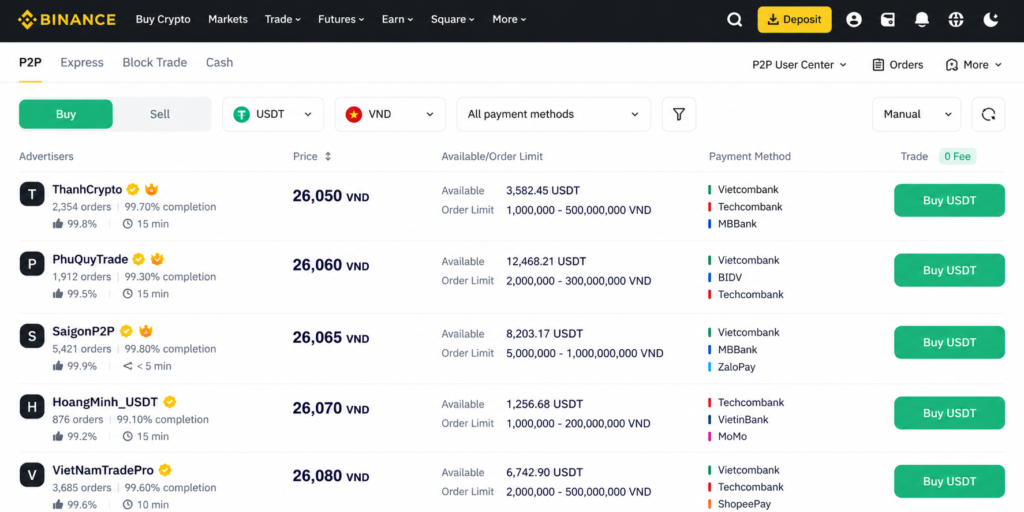
Buying USDT (Tether) is the safest starting point when discovering how to use binance p2p. Stablecoins act as the primary bridge to trade Bitcoin, Ethereum, or Altcoins on Binance Spot.
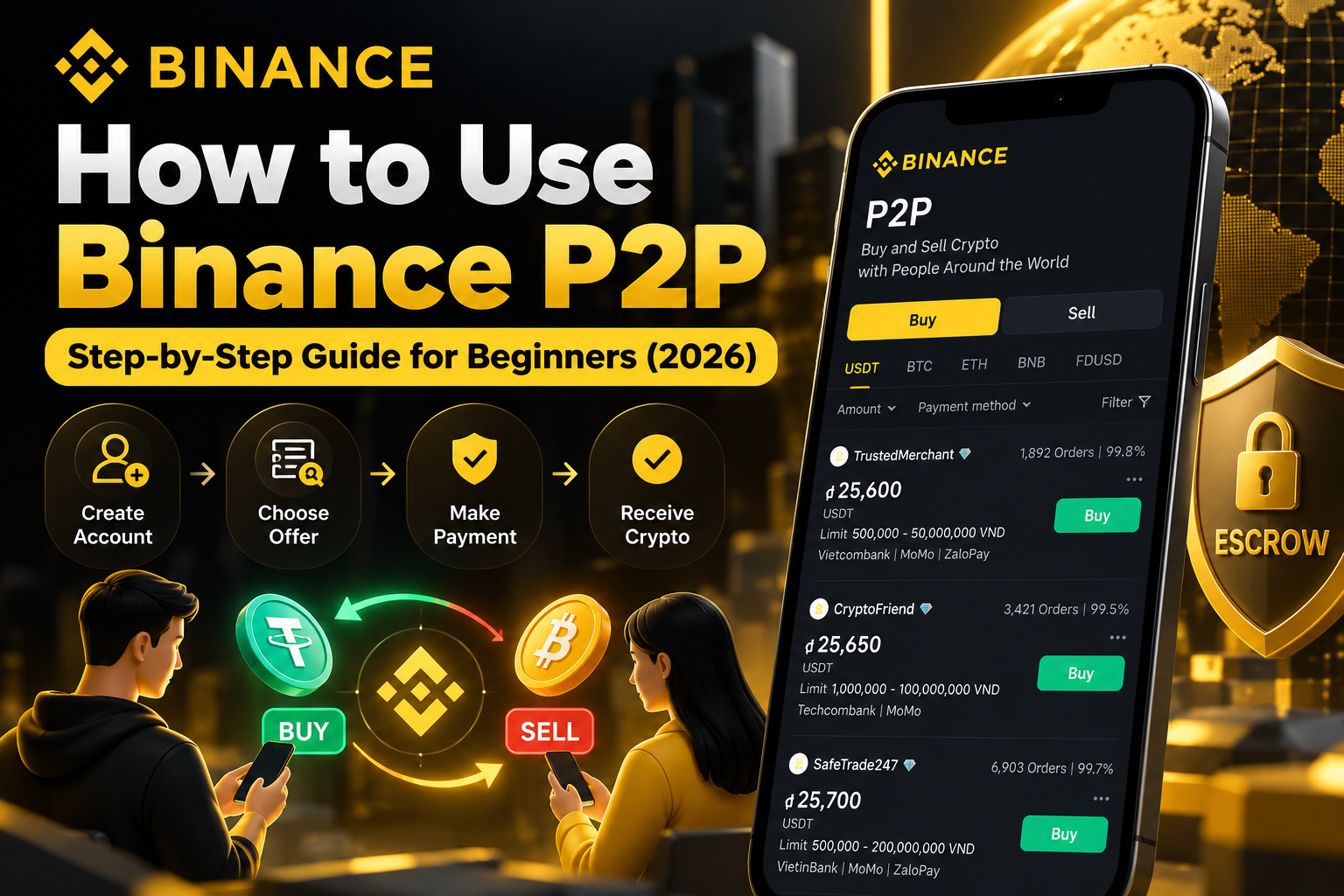
[ Step 1: Access P2P ] ➔ [ Step 2: Filter & Select Order ] ➔ [ Step 3: Send Local Payment ] ➔ [ Step 4: Confirm & Receive USDT ]
Step 1: Access Binance P2P and Set Up Payment
-
Log into your verified Binance Account (KYC identity verification is required before P2P trading).
-
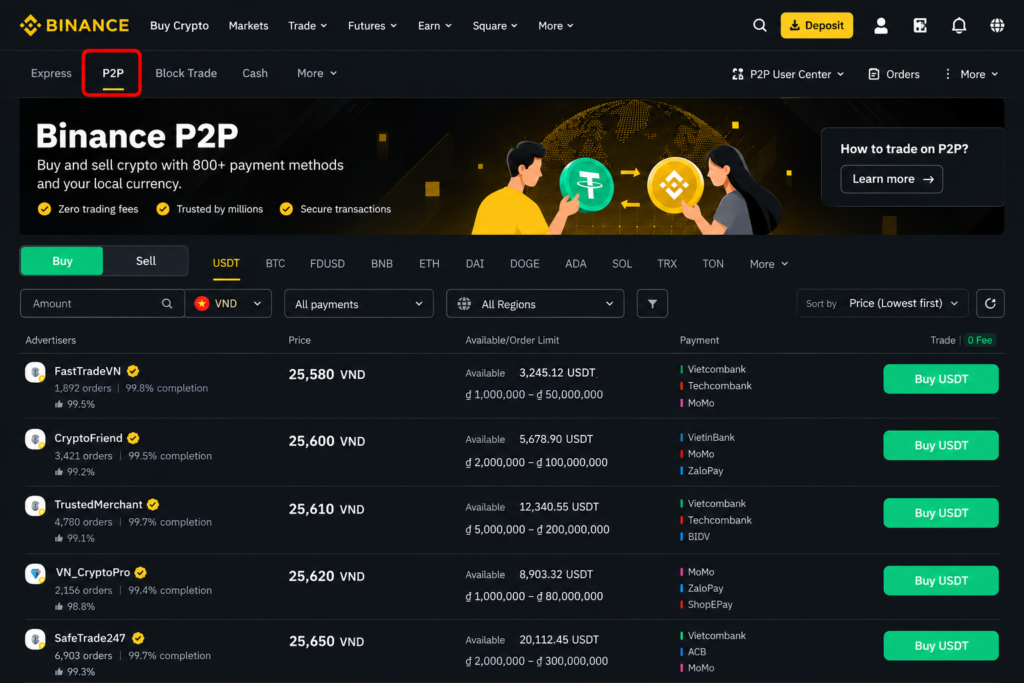
Go to Trade > P2P on desktop, or select P2P Trading on the Binance App homepage.
-
Ensure your local fiat currency (e.g., VND, NGN, PKR, EUR, USD) is selected in the top-right currency menu.
Step 2: Filter Offers and Select a Seller
-
Select the Buy tab and choose USDT.
-
Enter the Amount you want to spend and choose your preferred Payment Method (e.g., Bank Transfer) to filter ads.
-
Review available merchant ads. Look for seller indicators such as Completion Rate (95%+), Total Orders (200+), and verified Merchant Badges.
-
Click Buy USDT next to your chosen seller.
Step 3: Initiate Order and Pay the Seller
-
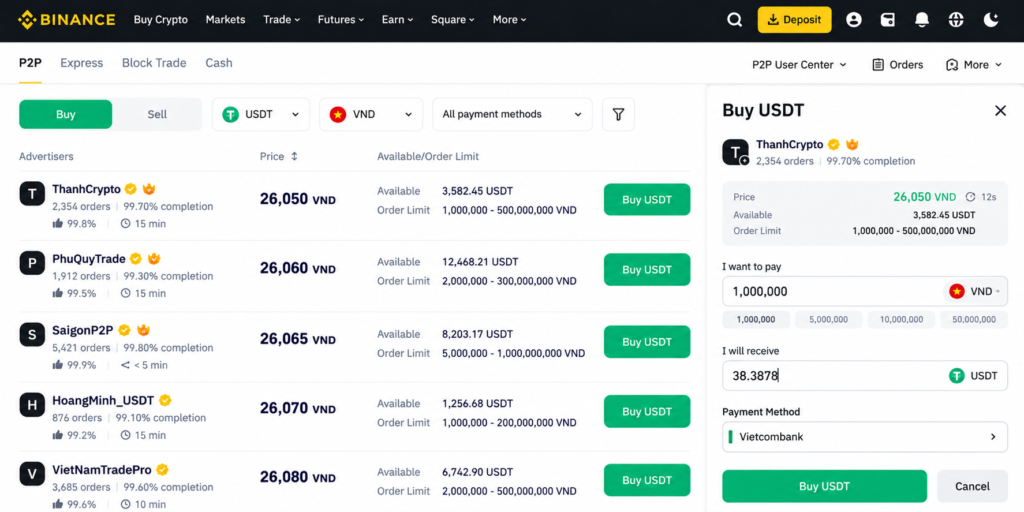
Enter the exact fiat amount you wish to pay. The system will automatically calculate the USDT you will receive.
-
Click Buy USDT to generate the order page.
-
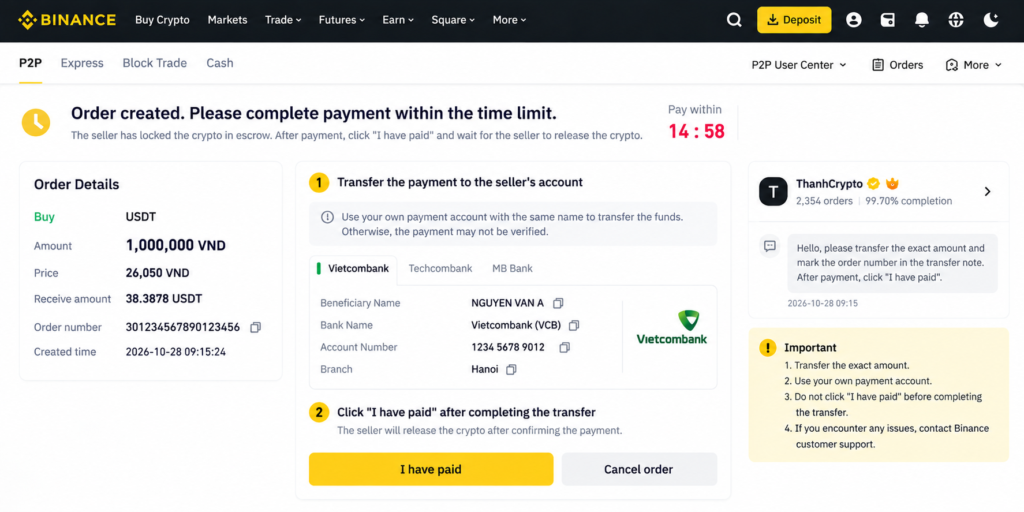
Copy the seller’s payment details (Bank Name, Account Number, Account Name) displayed on the screen.
-
Open your banking or e-wallet application and perform a direct transfer to the provided account details.
-
CRITICAL: Do NOT type words like “crypto”, “USDT”, “Binance”, or “Bitcoin” in the payment reference/memo box! Use only the reference code provided or leave it blank.
Step 4: Mark as Paid and Receive Assets
-
Once money is sent, return to Binance P2P and click “Transferred, notify seller” before the 15-minute countdown finishes.
-
Binance Escrow holds the seller’s USDT securely.
-
When the seller verifies the payment in their bank app, they release the assets. The USDT will instantly land in your Funding Wallet.
4. Step-by-Step Guide: How to SELL USDT for Cash to Your Bank
Knowing how to use binance p2p to cash out crypto into real money is just as vital as buying.
Related Resource: Looking to withdraw funds seamlessly? Read our comprehensive guide on How to Withdraw Crypto to Bank 2026 or explore tailored regional breakdowns in Best Crypto Exchange in Nigeria / Pakistan.
Step 1: Transfer Assets to Funding Wallet
-
Open your Wallet tab on Binance and choose Transfer.
-
Move your USDT from Spot Wallet (or Futures) to your Funding Wallet. P2P trades pull funds strictly from the Funding Wallet.
Step 2: Set Up Your Receiving Bank Details
-
Go to P2P User Center > Payment Methods.
-
Add your bank account number or e-wallet details. Ensure the account name matches your verified Binance KYC name exactly.
Step 3: Choose a Buyer and Place the Order
-
Navigate to P2P Trading and click the Sell tab.
-
Select USDT, filter by your currency, amount, and payment method.
-
Pick an active buyer with high completion stats and click Sell USDT.
-
Enter the quantity of USDT to sell and select your payment receiving account. Click Sell USDT.
Step 4: Verify Payment and Release Crypto
-
The buyer is given a set timeframe (e.g., 15 minutes) to transfer funds to your bank account.
-
DO NOT TRUST SMS NOTIFICATIONS OR SCREENSHOTS SENT BY BUYERS.
-
Open your official banking app and verify that the cash has fully settled into your account balance.
-
Once verified, return to Binance P2P and click “Payment Received”.
-
Complete 2FA security verification (Google Authenticator or SMS code) to authorize the Escrow release of USDT to the buyer.
5. How to Select Reliable Merchants & How Binance Escrow Works
Key Merchant Metrics to Evaluate
To protect your funds when mastering how to use binance p2p, never select a trading counterparty based purely on price. Always check these three metrics on a merchant profile:
-
Completion Rate: Aim for sellers/buyers with a 95% to 100% completion rate.
-
Total Orders & Trade Volume: Prioritize merchants who have completed 300+ trades over the last 30 days.
-
Yellow/Blue Verified Badge: Verified Merchants undergo extra screening and hold higher security deposits with Binance.
-
Avg Pay / Release Time: Choose merchants with an average payment/release time under 10 minutes for fast execution.
How Binance Escrow Safeguards Your Trades
How does escrow protect you when learning how to use binance p2p?
-
When a seller accepts a buy order, Binance automatically locks the corresponding crypto amount in Binance Escrow.
-
The seller cannot withdraw or move this locked crypto during the order window.
-
If the buyer pays and marks the order paid, the seller cannot run away with both the money and crypto—Binance customer support can manually release the locked crypto to the buyer after bank proof is reviewed.
-
If the buyer fails to pay within the payment limit (e.g., 15 minutes), the order cancels automatically and escrow releases crypto back to the seller.
6. Common P2P Scams and How to Avoid Them
Even with escrow protection, malicious actors try to trick beginners who are still learning how to use binance p2p. Here are the main scams and defense strategies:
1. The Fake Payment SMS / Fake Receipt Scam
-
How it works: A buyer marks the trade as paid and sends a fake bank transaction screenshot or a spoofed SMS pretending to be your bank.
-
How to avoid: Never rely on screenshots or SMS alerts. Log directly into your bank app and confirm the updated total balance.
2. Off-App Communication & Transfers
-
How it works: A counterparty asks you to contact them via WhatsApp, Telegram, or phone call to complete the payment.
-
How to avoid: Never leave the Binance P2P chat room. Binance Customer Support can only use official platform logs as evidence during appeals.
3. Third-Party Payment Scam
-
How it works: A buyer sends money from a bank account that does not match their verified Binance name. Later, the real owner of that bank account files a chargeback claiming fraud, causing your bank account to get frozen.
-
How to avoid: Reject third-party transfers. If the bank sender name doesn’t match the Binance KYC name, refund the money immediately and cancel/appeal the order.
4. Including Sensitive “Crypto” Keywords in Payment Notes
-
How it works: A buyer writes “USDT”, “Crypto”, or “Binance” in the bank transfer comment.
-
How to avoid: Banks in many regions flag or freeze accounts linked to crypto terms. Always keep transfer memos clean or use only the reference numbers provided.
7. How to Handle Trade Disputes (Filing an Appeal)
If a trade goes wrong while practicing how to use binance p2p, stay calm—the platform features a built-in dispute system.
-
Wait for the Timer: If the buyer marked “Paid” but you haven’t received money, or if the seller isn’t releasing crypto after you paid, wait until the appeal countdown button activates (usually 10–15 minutes).
-
Click Appeal: Tap Appeal on the order screen.
-
Upload Proof: Provide clear evidence:
-
If you are the buyer: Upload bank payment receipts showing transaction ID, amount, date, and seller account details.
-
If you are the seller: Upload a video recording of your official bank statement showing no incoming funds for that period.
-
-
Binance CS Intervention: A Binance Customer Support agent will review the escrow logs and evidence to manually complete or cancel the transaction safely.
Frequently Asked Questions (FAQ)
Is Binance P2P free to use, or are there hidden transaction fees?
Yes, trading on Binance P2P is completely free for general takers! If you respond to an existing ad on the marketplace to buy or sell cryptocurrency (acting as a Taker), Binance charges 0% platform fees.
However, keep the following potential external costs in mind:
-
Maker Fees: Users who post their own customized advertisements on the marketplace (Makers) pay a small transaction fee ranging from 0% to 0.35%, depending on the fiat currency and trading pair.
-
Bank & E-Wallet Fees: While Binance does not charge platform fees, your local bank or payment provider may impose standard transfer or interbank processing fees depending on the payment method selected.
How long does a typical Binance P2P transaction take to complete?
The vast majority of Binance P2P orders are completed within 5 to 15 minutes.
-
Standard Window: Most listings set a default payment countdown timer of 15 minutes once an order is initiated.
-
Fast Execution: If both the buyer and seller use instant online banking, mobile payment apps (e.g., Momo, Easypaisa, Chipper Cash), or local fast-payment rails, trades often finalize in under 2 minutes.
-
Extended Timers: Some merchants set extended payment windows (e.g., 30 to 60 minutes) to accommodate specific bank transfer methods that take longer to process. Always check the counterparty’s payment timeframe before opening an order.
What happens if I paid the seller but forgot to click “Transferred, notify seller”?
If you transferred money from your bank app but failed to tap “Transferred, notify seller” before the countdown timer reached zero, the system will automatically mark the order as Cancelled, and the locked crypto will be released back to the seller’s wallet.
If this happens, do not panic! Follow these immediate steps:
-
Do NOT re-pay the order.
-
Contact the Seller via Chat: Message the seller directly within the order history log, explain the situation, and upload your official bank transfer receipt showing the transaction ID, date, time, and recipient details.
-
Open an Appeal / Contact Customer Support: If the seller is unresponsive or refuses to release the crypto or refund your money, file an official appeal with Binance Customer Support immediately. Provide your transaction proof, and a Binance agent will step in to verify the payment and manually credit your crypto or coordinate a full refund.
Can I trade on Binance P2P without completing Identity Verification (KYC)?
No, you cannot trade on Binance P2P without full Identity Verification (KYC).
Binance enforces strict anti-money laundering (AML) and Know-Your-Customer (KYC) regulations to protect the platform and its global community from fraud, chargeback scams, and illegal financial activities. To access P2P trading, all users must complete at least Standard Identity Verification, which requires:
-
A valid government-issued photo ID (Passport, National ID card, or Driver’s License).
-
Facial recognition / liveness check.
-
Basic residential address details.
Additionally, the name on your verified Binance account must match the exact legal name on your bank account or payment provider. Third-party transfers (using someone else’s bank account) are strictly prohibited.
What should I do if a buyer marks an order as “Paid” but no money arrived in my bank?
If a buyer clicks the “Transferred, notify seller” button, but you haven’t received the cash in your account:
-
Never release the crypto prematurely. Do not click “Payment Received” based on fake screenshots, text messages, or email notifications sent by the buyer.
-
Check Your Banking App directly: Log in to your bank’s official app or web portal to verify your real account balance.
-
Wait for Interbank Delays: Occasionally, interbank transfers experience short technical delays. Message the buyer in the P2P chat room requesting a formal transfer receipt with a bank tracking reference.
-
File an Appeal: If the timer runs out and the money still hasn’t arrived in your balance, click Appeal. Binance Escrow will keep the crypto safely locked while customer support investigates the bank logs.
Essential Screenshots Guide for Learners
When executing trades, keep these key interfaces in mind:
-
P2P Marketplace Dashboard: Shows currency filters, payment method selections, and order listings.
-
Merchant Profile & Badges: Displays completion rates, total completed orders, and verified status.
-
Buy/Sell Order Screen: Shows payment countdown timers, precise account details, and chat interface.
-
Escrow Status Page: Confirms locked assets and options to release or appeal.
Conclusion & Legal Disclaimer
Mastering how to use binance p2p unlocks one of the most flexible, cost-effective, and powerful gateways into the global digital asset ecosystem. By bypassing traditional bank intermediaries and international transfer markup fees, peer-to-peer trading connects buyers and sellers directly across hundreds of local payment methods and fiat currencies worldwide.
Whether you are converting local currency into stablecoins like USDT or cashing out your crypto profits back into your personal bank account, maintaining operational discipline is paramount. Success on Binance P2P relies on adhering to strict safety principles at every step:
-
Trade Exclusively with High-Reputation Counterparties: Prioritize verified merchants maintaining a completion rate above 95% and a track record of high monthly transaction volumes.
-
Verify Payments Directly at the Source: Never rely on third-party payment screenshots, SMS notifications, or external email alerts. Always log into your personal banking or e-wallet application to confirm that funds have settled into your balance before releasing escrowed crypto.
-
Strictly Preserve In-App Communication: Keep every interaction, receipt attachment, and conversation strictly within the official Binance P2P chat room. This ensures that Binance Customer Support has an immutable, auditable log should a dispute or appeal arise.
-
Reject Third-Party Payments & Restrict Memos: Ensure that the banking account name matches the verified Binance KYC name of your trading counterparty. Never include sensitive words such as “crypto,” “USDT,” or “Binance” in bank transfer notes to avoid regional banking flags or account holds.
By combining the zero-fee benefits of taker trades with Binance’s protective escrow infrastructure and a proactive approach to security, you can trade digital assets with speed, liquidity, and peace of mind anywhere in the world.
Disclaimer: Cryptocurrency trading carries significant financial risk and market volatility. Peer-to-peer trading involves direct transactions with third parties; always verify bank details independently before confirming transfers. This article is for informational and educational purposes only and does not constitute financial, investment, or legal advice. Check your local regulations regarding cryptocurrency transactions in your jurisdiction.